


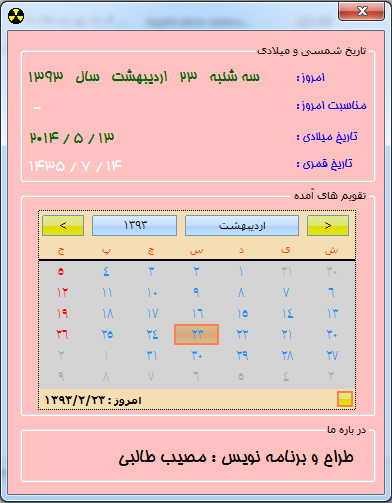
این برنامه تاریخ میلادی سیستم را به تاریخ شمسی و قمری تبدیل میکند.
نصویر محیط برنامه :
برای دیدن سورس برنامه با ادامه مطلب بروید.
تبدیل عدد ریاضی به حروف فارس با سی شارپ 2010
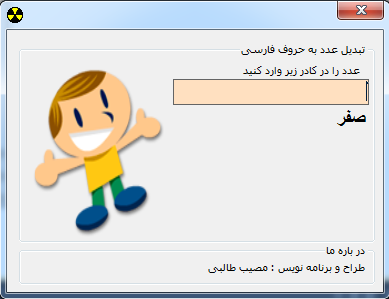
برنامه تبدیل عدد ریاضی به حروف فارسی در سی شارپ 2010.
تصویر محیط برنامه :
***********************
کد های برنامه :
فرم :
using System;
using System.Collections.Generic;
using System.ComponentModel;
using System.Data;
using System.Drawing;
using System.Text;
using System.Windows.Forms;
using mesal4;
namespace mesal4
{
public partial class Form1 : Form
{
mesal4.Tabdil tab = new mesal4.Tabdil();
public Form1()
{
InitializeComponent();
}
private void textBox1_TextChanged(object sender, EventArgs e)
{
foreach (char c in (sender as TextBox).Text)
if (c < '0' || c > '9')
{
(sender as TextBox).Text = "";
break;
}
if ((sender as TextBox).Text == string.Empty) (sender as TextBox).Text = "";
label2.Text = mesal4.Tabdil.GET_Number_To_PersianString(textBox1.Text);
}
private void Form1_Load(object sender, EventArgs e)
{
}
}
}
کد کلاس تبدیل :
using System;
using System.Collections.Generic;
using System.Text;
namespace mesal4
{
class Tabdil
{
public static string GET_Number_To_PersianString(string TXT)
{
string RET = " ", STRVA = " ";
string[] MainStr = STR_To_Int(TXT);
int Q = 0;
for (int i = MainStr.Length - 1; i >= 0; i--)
{
STRVA = " ";
if (RET != " " && RET != null)
STRVA = " و ";
RET = Convert_STR(GETCountStr(MainStr[i]), Q) + STRVA + RET;
Q++;
}
if (RET == " " || RET == null || RET == " ")
RET = "صفر";
return RET;
}
private static string[] STR_To_Int(string STR)
{
STR = GETCountStr(STR);
string[] RET = new string[STR.Length / 3];
int Q = 0;
for (int I = 0; I < STR.Length; I += 3)
{
RET[Q] = STR.Substring(I, 3);
Q++;
}
return RET;
}
private static string GETCountStr(string STR)
{
string RET = STR;
int LEN = (STR.Length / 3 + 1) * 3 - STR.Length;
if (LEN < 3)
{
for (int i = 0; i < LEN; i++)
{
RET = "0" + RET;
}
}
if (RET == "")
return "000";
return RET;
}
private static string Convert_STR(string INT, int Count)
{
string RET = "";
//یک صد
if (Count == 0)
{
if (INT.Substring(1, 1) == "1" && INT.Substring(2, 1) != "0")
{
RET = GET_Number(3, Convert.ToInt32(INT.Substring(0, 1)), " ") + GET_Number(1, Convert.ToInt32(INT.Substring(2, 1)), "");
}
else
{
string STR = GET_Number(0, Convert.ToInt32(INT.Substring(2, 1)), "");
RET = GET_Number(3, Convert.ToInt32(INT.Substring(0, 1)), GET_Number(2, Convert.ToInt32(INT.Substring(1, 1)), "") + STR) + GET_Number(2, Convert.ToInt32(INT.Substring(1, 1)), STR) + GET_Number(0, Convert.ToInt32(INT.Substring(2, 1)), "");
}
}
//هزار
else if (Count == 1)
{
RET = Convert_STR(INT, 0);
RET += " هزار";
}
//میلیون
else if (Count == 2)
{
RET = Convert_STR(INT, 0);
RET += " میلیون";
}
//میلیارد
else if (Count == 3)
{
RET = Convert_STR(INT, 0);
RET += " میلیارد";
}
//میلیارد
else if (Count == 4)
{
RET = Convert_STR(INT, 0);
RET += " تیلیارد";
}
//میلیارد
else if (Count == 5)
{
RET = Convert_STR(INT, 0);
RET += " بیلیارد";
}
else
{
RET = Convert_STR(INT, 0);
RET += Count.ToString();
}
return RET;
}
private static string GET_Number(int Count, int Number, string VA)
{
string RET = "";
if (VA != "" && VA != null)
{
VA = " و ";
}
if (Count == 0 || Count == 1)
{
bool IsDah = Convert.ToBoolean(Count);
string[] MySTR = new string[10];
MySTR[1] = IsDah ? "یازده" : "یک" + VA;
MySTR[2] = IsDah ? "دوازده" : "دو" + VA;
MySTR[3] = IsDah ? "سیزده" : "سه" + VA;
MySTR[4] = IsDah ? "چهارده" : "چهار" + VA;
MySTR[5] = IsDah ? "پانزده" : "پنج" + VA;
MySTR[6] = IsDah ? "شانزده" : "شش" + VA;
MySTR[7] = IsDah ? "هفده" : "هفت" + VA;
MySTR[8] = IsDah ? "هجده" : "هشت" + VA;
MySTR[9] = IsDah ? "نوزده" : "نه" + VA;
return MySTR[Number];
}
else if (Count == 2)
{
string[] MySTR = new string[10];
MySTR[1] = "ده";
MySTR[2] = "بیست" + VA;
MySTR[3] = "سی" + VA;
MySTR[4] = "چهل" + VA;
MySTR[5] = "پنجاه" + VA;
MySTR[6] = "شصت" + VA;
MySTR[7] = "هفتاد" + VA;
MySTR[8] = "هشتاد" + VA;
MySTR[9] = "نود" + VA;
return MySTR[Number];
}
else if (Count == 3)
{
string[] MySTR = new string[10];
MySTR[1] = "یکصد" + VA;
MySTR[2] = "دویست" + VA;
MySTR[3] = "سیصد" + VA;
MySTR[4] = "چهارصد" + VA;
MySTR[5] = "پانصد" + VA;
MySTR[6] = "ششصد" + VA;
MySTR[7] = "هفتصد" + VA;
MySTR[8] = "هشتصد" + VA;
MySTR[9] = "نهصد" + VA;
return MySTR[Number];
}
return RET;
}
}
}
برای دانلود بر رویه لینک زیر کلیک کنید .
پشتیبان گیری و باز یابی بانک اطلاعاتی sql2008در سی شارپ
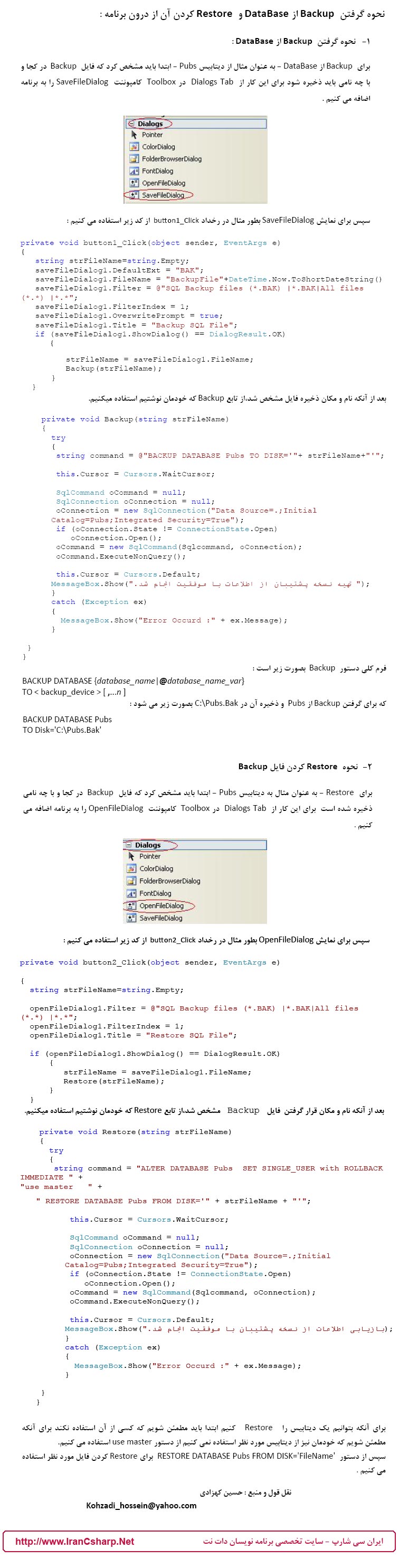
سورس کد پشتیبان گیری از بانک اطلاعاتی و بازگردانی اطلاعات.
************************************************************************
ذخیره عکس در بانک اطلاعاتی
پروژه ذخیره عکس در بانک اطلاعاتی :
عکس محیط نرم افزار :
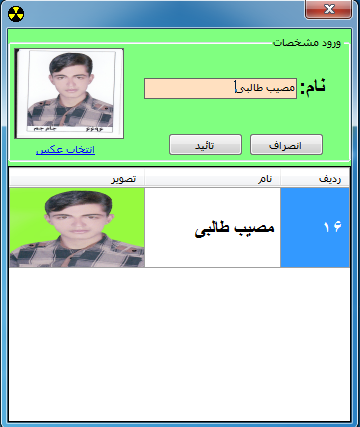
در این نرم افزار شما میتوانید اطلاعات یک شخص را وارد کرده و همراه عکس آن در بانک ذخیره کنید.
کد برنامه :
using System;
using System.Collections.Generic;
using System.ComponentModel;
using System.Data;
using System.Drawing;
using System.Text;
using System.Windows.Forms;
using System.Data.SqlClient;
namespace mesal3
{
public partial class Form1 : Form
{
// static public string con = @"Data Source=.\SQLEXPRESS;AttachDbFilename=|DataDirectory|\Database1.mdf;Integrated Security=True;User Instance=True";
SqlConnection cnn = new SqlConnection(@"Data Source=.\SQLEXPRESS;AttachDbFilename=|DataDirectory|\Database1.mdf;Integrated Security=True;User Instance=True");
public Form1()
{
InitializeComponent();
}
private void linkLabel1_LinkClicked(object sender, LinkLabelLinkClickedEventArgs e)
{
OpenFileDialog op = new OpenFileDialog();
if (op.ShowDialog() == DialogResult.OK)
{
pictureBox1.ImageLocation = op.FileName;
}
}
private void button1_Click(object sender, EventArgs e)
{
this.Close();
}
private void button2_Click(object sender, EventArgs e)
{
if (txtname.Text == "")
{
errorProvider1.SetError(txtname, "نام را وارد کنید");
}
else if (pictureBox1.Image == null)
{
errorProvider1.Clear();
errorProvider1.SetError(linkLabel1, "عکس را انتخاب کنید");
}
else
{
if (cnn.State == ConnectionState.Open)
{
string sql = "Insert Into tb_aks (name,imag) Values (@PersonName,@PersonImage)";
SqlCommand cmd = new SqlCommand(sql, cnn);
cmd.Parameters.AddWithValue("@PersonName", txtname.Text);
cmd.Parameters.AddWithValue("@PersonImage", ImageToByte(pictureBox1.Image));
cmd.ExecuteNonQuery();
MessageBox.Show("ثبت شد");
txtname.ResetText();
pictureBox1.Image = null;
re();
cnn.Close();
}
}
}
private void Form1_Load(object sender, EventArgs e)
{
if (cnn.State == ConnectionState.Closed)
{
cnn.Open();
}
re();
}
public static byte[] ImageToByte(Image img)
{
ImageConverter converter = new ImageConverter();
return (byte[])converter.ConvertTo(img, typeof(byte[]));
}
public void re()
{
string select = "select * from tb_aks";
SqlDataAdapter da = new SqlDataAdapter(select,cnn);
DataSet ds = new DataSet();
da.Fill(ds);
dataGridView1.DataSource =ds.Tables[0].DefaultView;
foreach (DataGridViewRow row in dataGridView1.Rows)
{
row.Height = 80;
}
}
private void dataGridView1_CellContentClick(object sender, DataGridViewCellEventArgs e)
{
//int row = dataGridView1.CurrentRow.Index;
//string select = "select * from tb_aks";
//SqlDataAdapter da = new SqlDataAdapter(select, cnn);
//DataSet ds = new DataSet();
//DataTable dt = new DataTable ();
//da.Fill(dt);
//txtname.Text = dt.Rows[0]["name"].ToString();
//pictureBox1.Image =ImageToByte(dataGridView1.Rows.Cells["Column1"].Value);
}
}
}
برای دانلود از لینک زیر استفاده کنید...
نرم افزار فاکتر گیری از دیتا بیس SQL2008 و c#2010
برنامه بانک اطلاعاتی sql 2008.
این برنامه اطلاعات یک گروه را در یافت کرده و آن را در بانک اطلاعاتی ذخیره میکند.
با قابلیت گزارش گیری از بانک.
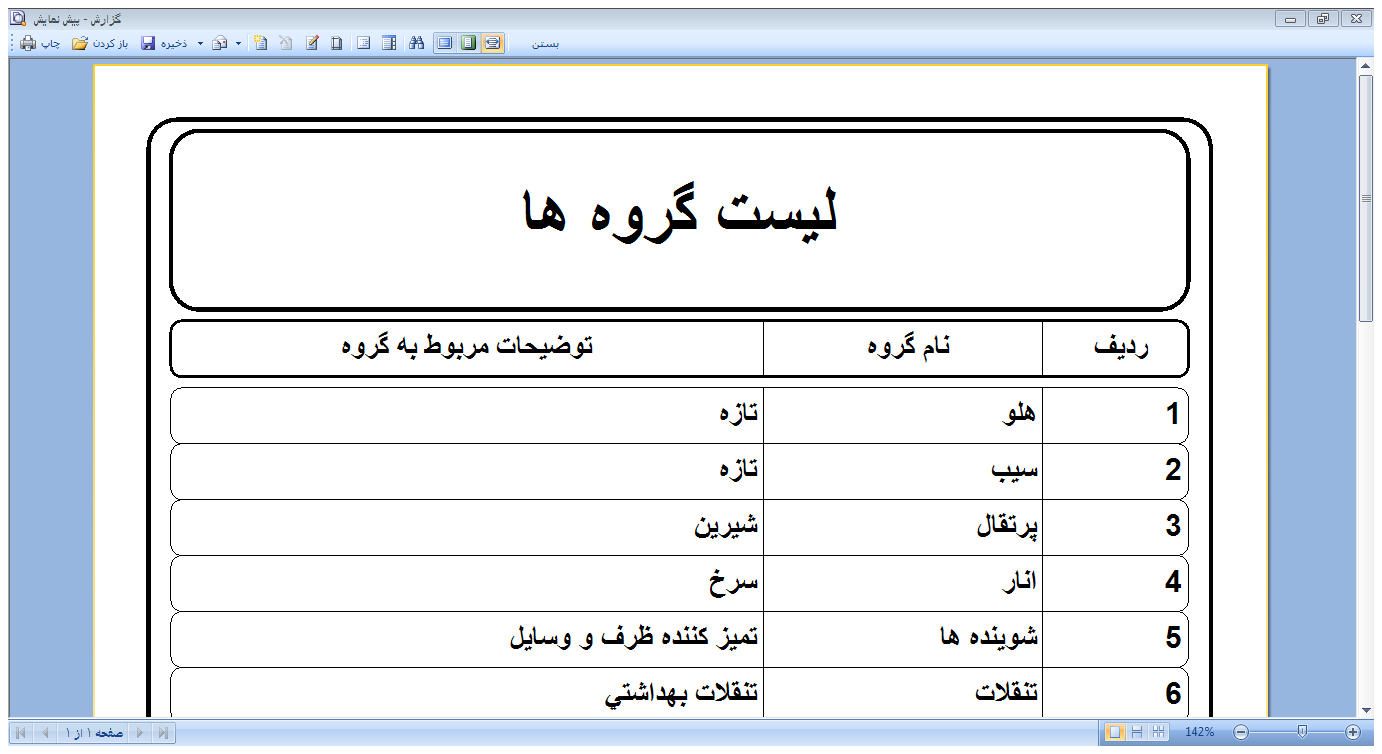
نمایش پیش فاکتور و چاپ فا کتور.
تصاویری از محیط نرم افزار :
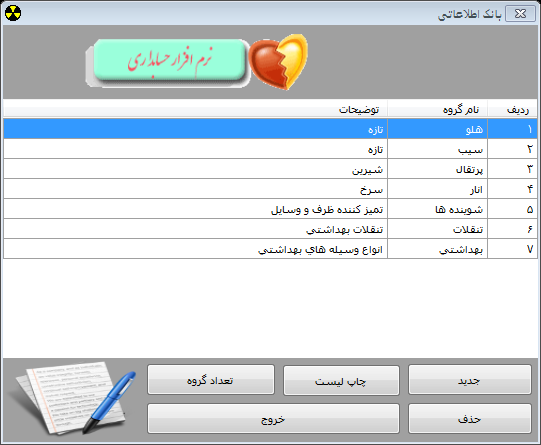
فرم مدیریت چاپ فاکتور :
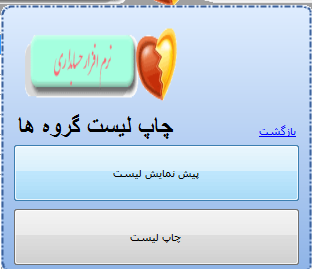
نمونه فاکتور :
***************************************************************
کد های برنامه :
کد فرم اصلی :
using System;
using System.Collections.Generic;
using System.ComponentModel;
using System.Data;
using System.Drawing;
using System.Text;
using System.Windows.Forms;
using System.Data.SqlClient;
namespace mesal2
{
public partial class Form1 : Form
{
static public string con = @"Data Source=.\SQLEXPRESS;AttachDbFilename=|DataDirectory|\Database1.mdf;Integrated Security=True;User Instance=True";
SqlConnection cnn = new SqlConnection(Form1.con);
int cod = 0;
public Form1()
{
InitializeComponent();
}
private void button6_Click(object sender, EventArgs e)
{
Application.Exit();
}
private void Form1_Load(object sender, EventArgs e)
{
cnn.Open();
SqlCommand cmd = new SqlCommand();
cmd.Connection = cnn;
cmd.CommandText = "SELECT * FROM tb_grop";
SqlDataAdapter da = new SqlDataAdapter();
da.SelectCommand = cmd;
DataTable dt = new DataTable();
da.Fill(dt);
dataGridView1.DataSource = dt;
cnn.Close();
}
private void button1_Click(object sender, EventArgs e)
{
frmadd ad = new frmadd();
ad.ShowDialog();
Form1_Load(null, null);
}
private void button5_Click(object sender, EventArgs e)
{
cnn.Open();
SqlCommand cmd = new SqlCommand();
cmd.Connection = cnn;
cmd.CommandText = "SELECT * FROM tb_grop";
SqlDataAdapter da = new SqlDataAdapter();
da.SelectCommand = cmd;
DataTable dt = new DataTable();
da.Fill(dt);
dataGridView1.DataSource = dt;
cnn.Close();
FMessegeBox.FarsiMessegeBox.Show(" تعداد گرو ها برابر است با :\r\n"
+ dt.Rows.Count + " عدد", "تعداد گروه ها",
FMessegeBox.FMessegeBoxButtons.Ok, FMessegeBox.FMessegeBoxIcons.Information);
}
private void dataGridView1_DoubleClick(object sender, EventArgs e)
{
try
{
frmedit ed = new frmedit();
ed.txtcod.Text = dataGridView1.CurrentRow.Cells["ID"].Value.ToString();
ed.txtname.Text = dataGridView1.CurrentRow.Cells["Nameg"].Value.ToString();
ed.txtinformatin.Text = dataGridView1.CurrentRow.Cells["information"].Value.ToString();
ed.ShowDialog();
Form1_Load(null, null);
}
catch
{
}
}
private void button3_Click(object sender, EventArgs e)
{
try
{
DialogResult dr;
dr = FMessegeBox.FarsiMessegeBox.Show("آیا گروه انتخاب شده را حذف می کنید ؟", "مدیریت", FMessegeBox.FMessegeBoxButtons.YesNo, FMessegeBox.FMessegeBoxIcons.Question);
if (dr == System.Windows.Forms.DialogResult.Yes)
{
cnn.Open();
SqlCommand cmd = new SqlCommand();
cmd.Connection = cnn;
string sql = "delete FROM tb_grop WHERE id = {0}";
sql = string.Format(sql, cod);
cmd.CommandText = sql;
cmd.ExecuteNonQuery();
cnn.Close();
FMessegeBox.FarsiMessegeBox.Show("گرو حذف شد", "پیام", FMessegeBox.FMessegeBoxButtons.Ok, FMessegeBox.FMessegeBoxIcons.Information);
Form1_Load(null, null);
}
else { return; }
}
catch
{
}
}
private void dataGridView1_Click(object sender, EventArgs e)
{
try
{
cod = Convert.ToInt32(dataGridView1.CurrentRow.Cells["ID"].Value.ToString());
}
catch
{
}
}
private void button4_Click(object sender, EventArgs e)
{
frmreport r = new frmreport();
r.ShowDialog();
}
}
}
کد فرم اضافه کردن گروه :
using System;
using System.Collections.Generic;
using System.ComponentModel;
using System.Data;
using System.Drawing;
using System.Text;
using System.Windows.Forms;
using System.Data.SqlClient;
namespace mesal2
{
public partial class frmadd : Form
{
SqlConnection cnn = new SqlConnection(Form1.con);
public frmadd()
{
InitializeComponent();
}
private void btnclose_Click(object sender, EventArgs e)
{
this.Close();
}
private void btnok_Click(object sender, EventArgs e)
{
try
{
if (txtname.Text == "")
{
errorProvider1.SetError(txtname, "نام گروه را وارد کنید");
}
else if (txtinformatin.Text == "" )
{
errorProvider1.Clear();
errorProvider1.SetError(txtinformatin, "توضیحات گروه را وارد کنید");
}
else
{
errorProvider1.Clear();
cnn.Open();
SqlCommand cmd = new SqlCommand();
cmd.Connection = cnn;
string sql = "insert into tb_grop(name,information) values ('{0}','{1}')";
sql = string.Format(sql, txtname.Text, txtinformatin.Text);
cmd.CommandText = sql;
cmd.ExecuteNonQuery();
cnn.Close();
FMessegeBox.FarsiMessegeBox.Show("گرو ثبت شد", "پیام", FMessegeBox.FMessegeBoxButtons.Ok, FMessegeBox.FMessegeBoxIcons.Information);
this.Close();
}
}
catch
{
FMessegeBox.FarsiMessegeBox.Show("گرو ثبت نشد", "پیام", FMessegeBox.FMessegeBoxButtons.Ok, FMessegeBox.FMessegeBoxIcons.Exclamtion);
}
}
private void panelEx1_Click(object sender, EventArgs e)
{
}
}
}
کد فرم ویرایش :
using System;
using System.Collections.Generic;
using System.ComponentModel;
using System.Data;
using System.Drawing;
using System.Text;
using System.Windows.Forms;
using System.Data.SqlClient;
namespace mesal2
{
public partial class frmedit : Form
{
SqlConnection cnn = new SqlConnection(Form1.con);
public frmedit()
{
InitializeComponent();
}
private void btnclose_Click(object sender, EventArgs e)
{
this.Close();
}
private void btnok_Click(object sender, EventArgs e)
{
try
{
if (txtname.Text == "")
{
errorProvider1.SetError(txtname, "نام را وارد نکردی");
}
else if (txtinformatin.Text == "")
{
errorProvider1.Clear();
errorProvider1.SetError(txtinformatin, "توضیحات را وارد نکردید");
}
else
{
cnn.Open();
SqlCommand cmd = new SqlCommand();
cmd.Connection = cnn;
string sql = "UPDATE tb_grop SET name = N'{0}' , information = N'{1}' WHERE id = {2}";
sql = string.Format(sql, txtname.Text, txtinformatin.Text,Convert.ToInt32(txtcod.Text));
cmd.CommandText = sql;
cmd.ExecuteNonQuery();
cnn.Close();
FMessegeBox.FarsiMessegeBox.Show("گرو ,یرایش شد", "پیام", FMessegeBox.FMessegeBoxButtons.Ok, FMessegeBox.FMessegeBoxIcons.Information);
this.Close();
}
}
catch
{
}
}
private void panelEx1_Click(object sender, EventArgs e)
{
}
}
}
کد فرم گزارش :
using System;
using System.Collections.Generic;
using System.ComponentModel;
using System.Data;
using System.Drawing;
using System.Text;
using System.Windows.Forms;
using System.Data.SqlClient;
namespace mesal2
{
public partial class frmreport : Form
{
SqlConnection cnn = new SqlConnection(Form1.con);
public frmreport()
{
InitializeComponent();
}
private void linkLabel1_LinkClicked(object sender, LinkLabelLinkClickedEventArgs e)
{
this.Close();
}
private void button1_Click(object sender, EventArgs e)
{
cnn.Open();
SqlCommand cmd = new SqlCommand();
cmd.Connection = cnn;
cmd.CommandText = "SELECT * FROM tb_grop";
SqlDataAdapter da = new SqlDataAdapter();
da.SelectCommand = cmd;
DataTable dt = new DataTable();
da.Fill(dt);
stiReport1.Load(@"report\list.mrt");
stiReport1.RegData(dt);
stiReport1.Show();
cnn.Close();
}
private void button2_Click(object sender, EventArgs e)
{
cnn.Open();
SqlCommand cmd = new SqlCommand();
cmd.Connection = cnn;
cmd.CommandText = "SELECT * FROM tb_grop";
SqlDataAdapter da = new SqlDataAdapter();
da.SelectCommand = cmd;
DataTable dt = new DataTable();
da.Fill(dt);
stiReport1.Load(@"report\list.mrt");
stiReport1.RegData(dt);
stiReport1.Print();
cnn.Close();
}
}
}
**************************************************************************************************
برای دانلود از لینک زیر استفاده کنید.
برنامه حرکت تصویر بر رویه فرم c#2010
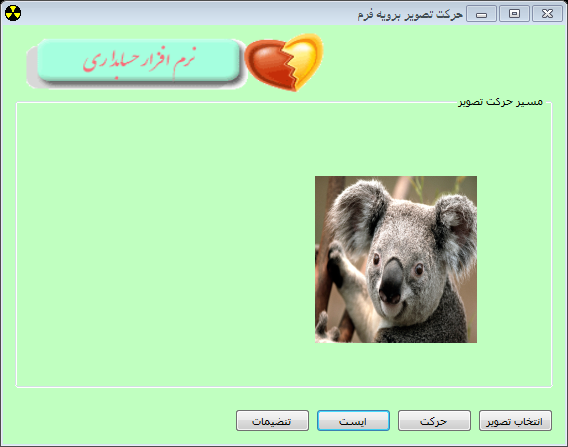
برنامه زیر عکس را برویه فرم به حرکت در می آورد.
کد به صورت زیر است .
شما میتوانید برنامه را از همین جا دانلود کنید .
تصویر محیط نرم افزار :
کد برنامه :
فرم اصلی :
using System;
using System.Collections.Generic;
using System.ComponentModel;
using System.Data;
using System.Drawing;
using System.Text;
using System.Windows.Forms;
using System.Drawing.Text;
namespace mesal1
{
public partial class Form1 : Form
{
static public int tim;
public Form1()
{
InitializeComponent();
}
private void btnimage_Click(object sender, EventArgs e)
{
if (timer1 .Enabled = true)
{
timer1.Enabled = false;
pictureBox1.Image = null;
}
openFileDialog1.Filter = "Jpg(*.jpg)|*.jpg|Gif(*.gif)|*.gig";
if (openFileDialog1.ShowDialog() == System.Windows.Forms.DialogResult.OK)
{
pictureBox1.ImageLocation = openFileDialog1.FileName;
}
}
private void timer1_Tick(object sender, EventArgs e)
{
if(pictureBox1.Left <= panel1.Width)
{
pictureBox1.Left = pictureBox1.Left + 100;
}
else
{
pictureBox1.Left = 0;
}
}
private void btnstart_Click(object sender, EventArgs e)
{
timer1.Interval = Properties.Settings.Default.time;
timer1.Enabled = true;
}
private void btnstop_Click(object sender, EventArgs e)
{
timer1.Enabled = false;
}
private void btntanzimat_Click(object sender, EventArgs e)
{
timer1.Enabled = false;
Form2 t = new Form2();
t.ShowDialog();
}
private void Form1_Load(object sender, EventArgs e)
{
InstalledFontCollection fo = new InstalledFontCollection();
}
}
}
فرم تنضیمات :
using System;
using System.Collections.Generic;
using System.ComponentModel;
using System.Data;
using System.Drawing;
using System.Text;
using System.Windows.Forms;
namespace mesal1
{
public partial class Form2 : Form
{
public Form2()
{
InitializeComponent();
}
private void buttonX1_Click(object sender, EventArgs e)
{
this.Close();
}
private void buttonX2_Click(object sender, EventArgs e)
{
if (txttime.Text == "")
{
errorProvider1.SetError(txttime, "زمان تایمر را مشخص نکردی");
}
else
{
errorProvider1.Clear();
Properties.Settings.Default.time = Convert.ToInt32(txttime.Text);
Properties.Settings.Default.Save();
txttime.ResetText();
this.Close();
}
}
private void txttime_KeyDown(object sender, KeyEventArgs e)
{
if (e.KeyCode == Keys.Enter)
{
if (txttime.Text == "")
{
errorProvider1.SetError(txttime, "زمان تایمر را مشخص نکردی");
}
else
{
errorProvider1.Clear();
Properties.Settings.Default.time = Convert.ToInt32(txttime.Text);
Properties.Settings.Default.Save();
txttime.ResetText();
this.Close();
}
}
}
}
}
برای دانلود بر رویه لینک زیر کلیک کنید
رایانه چیکاپ


#######################
رایانه چیکاپ
طراحی نرم افزار حساب داری
با بهترین کیفیت و قیمت مناسب.
برای سفارش طراحی نرم افزار با شماره
09172642946 تماس حاصل فرمایید.
مژده :::::::
آموزش موارد زیر در سایت قرار خواهد گرفت...
بزودی زود ... منتظر باشید ...!...!...
طراحی هواپیما مدل و آموزش ساخت.
طراحی مدارات الکتریکی.
طراحی LED ثابت و روان .
طراحی ربات های اموزشی.
انواع نقشه های هواپیما مدل .
انواع مدارهای طراحی شده مفید.
انواع کتاب های آموزشی .
ساخت انواع کار دستی برا کودکان شما.
آموزش کامل سخت ابزار .
آموزش بستن شبکه های کوچک.
و...
____________________________
منتظر حرفه های جدید من باشید
____________________________
########################

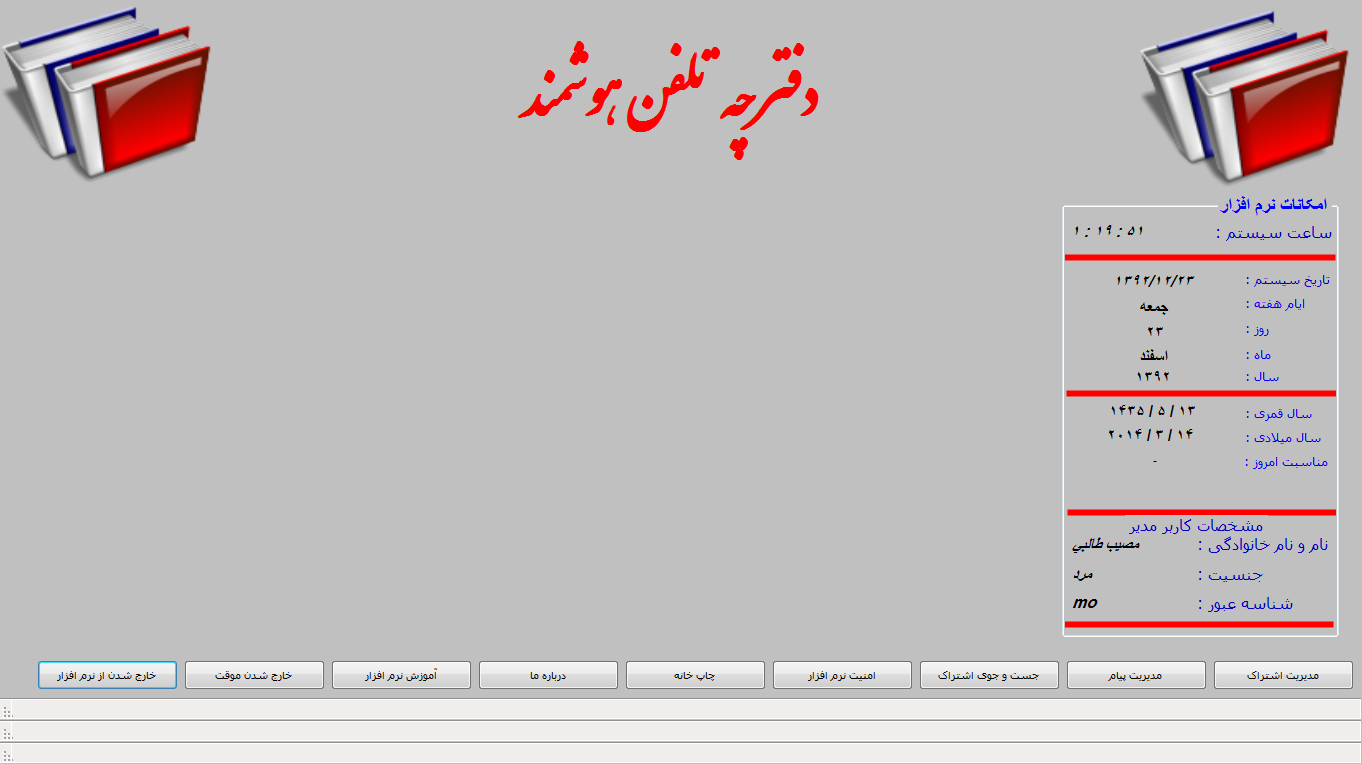
نرم افزار دفتر تلفن هوشمند
نرم افزار دفتر تلفن هوشمند .
قیمت : 300.000 ریال
برای خرید نرم افزار با شماره زیر تماس بگیرید
09172642946
تصاویر محیط نرم افزار
فرم اصلی :
تقویم 1393 پیشرفته
تقویم کامل سال 1393 .
با محیطی زیبا و ساده با تمام امکانات یک تقویم خوب.
نمایش مناسب ها به صورت اتوماتیک .
مناسب برای تمام سیستم عامل ها
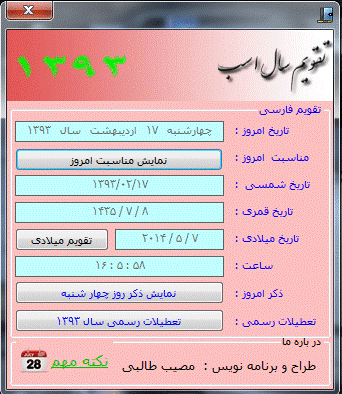
تصاویری از امکانات تقویم.
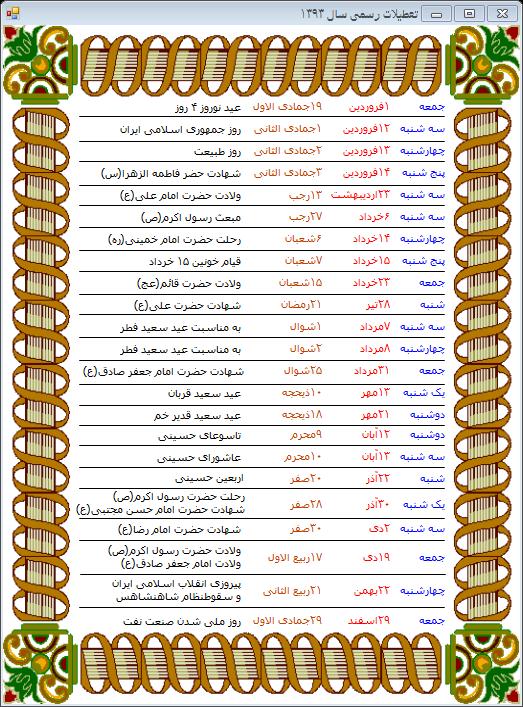
نمایش تعطیلات رسمی سال 1393 با گرافیکی بسیار خوب :
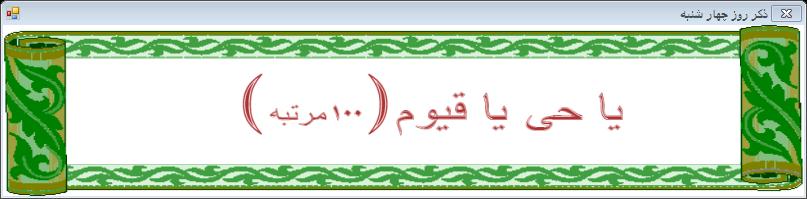
نماشی ذکر مربوط به همان روز :
و دیگر امکانات ...
ليست صفحات
 زهرا - مرسی خوب بود - دوشنبه 08 دی 1404
سحربانو - سلام مصیب طالبی
زهرا - مرسی خوب بود - دوشنبه 08 دی 1404
سحربانو - سلام مصیب طالبی خوبی؟
منو یادته؟
قبلا توی چت لوکس بلاگ صحبت کرده بودیم
چند روزه مشغول جمع آوری بهترین وبلاگهای لوکس بلاگ هستم از تو هم دعوت می کنم با تبادل لینک عضو گروه ما بشی..
مصیب طالبی بهم سر بزن منتظرتم - دوشنبه 08 دی 1404
نازی - سلام چرا جواب منو توی چت نمیدی مصیب طالبی ؟ چقدر بگم بیا با من تبادل لینک کن تا بازدید وبلاگ هامون زیاد شه ؟ بیا وبلاگم رو ببین فقط مخصوص افزایش بازدیده . فقط کافیه تبادل لینک کنی. همین الان بیا بهم سر بزن ............. - دوشنبه 08 دی 1404
ميلاد - سلام جديدترين مقالات، تحقيقات، پروژه ها، پايان نامه، كليه مطالب درسي و دانشگاهي، دانش آموزي و ... فقط در سايت ما با دريافت آنلاين و بدون وقفه، همچنين در با فرمت ورد و قابل ويرايشدر قسمت موضوعات كليه رشته ها جمع آوري شده است.
فني و مهندسي – علوم انساني – علوم پزشكي - علوم پايه و ....
http://payanname69.lxb.ir
اين هم كد بنر ماست قرار بديد لطفا :
<!-- start logo cod off http://payanname69.loxblog.com --><p align="center"><p align="center"><a href="http://payanname69.loxblog.com" target="_blank"><img border="0" src=" http://8pic.ir/images/nji0kjc0xb78n5qwgh7i.gif" width="468" height="60" alt="دانلود پایان نامه و مقالات اموزشی"></a></p><!--finish logo cod off http://payanname69.loxblog.com -->
- دوشنبه 08 دی 1404
بهار - وبلاگت فوق العادست مصیب طالبی واقعا لذت بردم ، ولی حیف بازدیدت کمه ، چرا با سایت های بزرگ تبادل لینک نمی کنی تا بازدیدت بالا بره ؟ یه سری به این سایت که واست گذاشتم بزن و باهاش تبادل لینک کن . بازدیدت رو از این رو به اون رو می کنه .... فقط یه بار امتحان کن - دوشنبه 08 دی 1404
حامد - سلام داش قرار بود کد اون قرمزرو بدی چی شد پسسسسسس - دوشنبه 08 دی 1404
راز میلیونر شدن - خیلی از اتفاقات مهم زندگی به صورت اتفاقی هستند...باور نداری؟؟؟این پست وب من و یه نگاه بنداز...خوندنش خیلی طول نمیکشه،خدا خواسته که شانس اومده در خونت،از دستش ندهhttp://myworky.mihanblog.com/post/46 - دوشنبه 08 دی 1404
محمد - با سلام وبلاگ خیلی پر باری دارید - دوشنبه 08 دی 1404
حامد - <!-- start logo cod off http://lorestan-chat.ir --><p align="center"><p align="center"><a href="http://lorestan-chat.ir" target="_blank"><img border="0" src="http://www.loxblog.com/userfiles/pimage/53026104ed0749 07dc9.gif" width="450" height="75" alt="دوتامون چت"></a></p><!--finish logo cod off http://lorestan-chat.ir --> - دوشنبه 08 دی 1404توضیحات آگهی در حدود 2 خط. ماهینه فقط 10 هزار تومان
توضیحات آگهی در حدود 2 خط. ماهینه فقط 10 هزار تومان
فراموشی رمز عبور
نام کاربری یا ایمیل خود را وارد کنید
کد ۶ رقمی ارسالشده به ایمیل و رمز عبور جدید را وارد کنید.
ثبت نام کاربران
در چند ثانیه حساب کاربری خود را بسازید
نظرات کاربران
دیدگاه خود را با ما در میان بگذارید
ورود کاربران
خوش آمدید! لطفا وارد حساب خود شوید